Font Embedding vs. Outlining: What Every Print Enthusiast Should Know
When preparing documents for professional printing, ensuring your typography displays correctly is essential. Two key methods—font embedding and font outlining—play a vital role in preserving your design across different systems and print environments.
1. What is Font Embedding?
Font Embedding involves including the actual font files within a document (commonly PDFs). PDF viewers can use these embedded fonts to faithfully render text—even on computers that don’t have the font installed locally.
✅ Advantages:
-
Editable text retains its typeface, size, and kerning.
-
Searchable and selectable text supports document accessibility and indexing.
-
Compact file sizes—only needed glyphs are included.
⚠️ Considerations:
-
Licensing restrictions: Some fonts disallow embedding or limit usage. Always check the font’s licensing terms.
-
Compatibility: Older software or specific printing systems may misinterpret embedding settings, leading to font substitution.
2. What is Font Outlining?
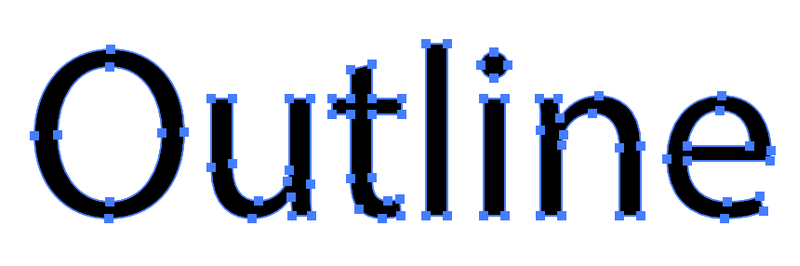
Font Outlining (or “converting text to outlines/curves”) turns text into vector shapes before exporting. The words are no longer editable but become graphic paths.
✅ Advantages:
-
Absolute consistency: The printed appearance is guaranteed—no discrepancies in font rendering.
-
No licensing complexities: You’re not distributing font files, just vector shapes.
-
Reliable across platforms: Software variations won’t affect how outlined text displays.
⚠️ Considerations:
-
Loss of editability: Future text changes require manual adjustments.
-
No searchability: Text becomes unselectable, affecting accessibility and indexing.
-
Larger file sizes: Detailed vector shapes can inflate file size.
3. Which Should You Use for Print?
Optimal Workflow for Ewan Printing Projects:
-
Embed fonts by default
Ideal for draft PDFs needing edits, client proofs, or accessibility. -
Apply outlining as a final safety step
When files are final and clients won’t need to edit text again, converting them to outlines ensures maximum fidelity and compatibility.
This two-step process preserves flexibility during design and secures reliability at print time—a best practice in professional print environments.
4. Quick Tips for Clients
-
Check font licenses before embedding—especially with premium or custom typefaces.
-
Proofread before outlining—since text becomes unchangeable afterward.
-
Save copies of your editable files before outlining—they’ll be needed for future revisions.
-
Use PDF/X-1a or PDF/X-4 standards—these ensure font embedding and embedding guidelines are respected, leading to better print results.
5. Why It Matters for Ewan Printing
Inconsistent typography or missing fonts can lead to:
-
Unexpected font substitution, altering your design intent.
-
File preparation setbacks, slowing down your project timeline.
-
Increased costs, from wasted proofs to reprints.
By following rigorous embedding and outlining protocols, Ewan Printing guarantees:
-
Faithful reproduction of your design vision.
-
Efficient production workflows, minimizing errors.
-
High-quality deliverables, every time.
6. Practical Workflow Example
-
Design phase (InDesign/Illustrator):
Work with editable fonts. -
Export draft PDF:
-
Embed fonts
-
Send for review
-
-
Incorporate feedback
-
Export final print PDF:
-
Embed fonts
-
Outline text
-
Embed images and color profiles
-
Ensure PDF/X compliance
-
-
Upload/Send to Ewan Printing:
Your file is ready for seamless, top-quality printing.
📌 Takeaway
Font embedding preserves both editability and fidelity for most of the project lifecycle, while font outlining ensures absolute visual consistency at print time. By combining both—embedding during design review and outlining for final submission—you strike the perfect balance between flexibility and print reliability.
If you’d like help preparing files or have questions about font licensing, Ewan Printing’s expert team is ready to assist—ensuring your typography shines exactly as you envision it.
The most trusted and quality printing company, with excellent customer service. Best Quality Printing in Dubai
#EWANPRINTING
WhatsApp/Call us:
Arabic: 055 5771552
Arabic & English: 056 5071752 – (Send Query) https://wa.me/message/ZCPEMGR67ZD6G1
English | Urdu | Hindi: 050 508 6855
For latest offers
Email: printingewan@gmail.com
Location: Shop 26 and 28, Al Nasiriya Building, 247 Damascus Street, Al Qusais Industrial Area 1, Dubai, UAE

Leave a Reply