Achieving Perfection in Print: The Crucial Role of Image Clarity and Sharpness
In the vibrant world of print, where every detail matters, the clarity and sharpness of your images are paramount. At Ewan Printing, we understand that a blurry or pixelated image can significantly diminish the impact of your printed materials, whether it’s a stunning brochure, a crucial business card, or a vibrant large-format banner. This article delves into why image clarity and sharpness are so vital for professional printing and how you can ensure your visuals are print-ready.
The Foundation of Quality: Resolution (PPI and DPI)
At the heart of image clarity lies resolution. For digital images, this is typically measured in Pixels Per Inch (PPI), indicating the density of pixels in your image. For printed output, we talk about Dots Per Inch (DPI), which refers to how many ink dots a printer lays down per inch of paper.
The general rule of thumb for high-quality prints is to aim for 300 PPI. This density ensures that when your digital image is translated into ink on paper, it retains crisp details and smooth transitions, avoiding the dreaded pixelation or graininess that can occur with lower resolutions. While larger prints viewed from a distance might tolerate lower PPI, for anything viewed up close – like brochures, flyers, or business cards – 300 PPI is the industry standard for excellence.
Why Clarity and Sharpness Matter for Your Prints
- Professional Appearance: Sharp, clear images convey professionalism and attention to detail. This immediately elevates your brand’s perception and leaves a positive, lasting impression on your audience.
- Enhanced Detail and Impact: High-resolution images allow for the accurate reproduction of fine details, intricate graphics, and subtle textures. This is especially critical for projects like product catalogs, intricate illustrations, or professional photographs where every nuance contributes to the overall visual impact.
- Accurate Color Reproduction: More pixels mean a better representation of color gradations and shades. This ensures that the colors in your printed materials are vibrant, true-to-life, and accurately reflect your original design.
- Versatility in Sizing: High-resolution images offer greater flexibility. You can crop, resize, and scale them without a significant loss of quality, which is invaluable when adapting your designs for various print formats.
- Avoiding Pixelation and Blur: The most common pitfall of low-resolution images is pixelation. When an image with insufficient pixels is enlarged, each pixel becomes visible, resulting in a blocky, unprofessional appearance. A lack of sharpness leads to a soft, out-of-focus look, making your message less impactful.
Tips for Optimizing Your Images for Print
To ensure your images are print-perfect, consider the following:
- Start with High-Quality Source Images: The best way to avoid resolution issues is to begin with the highest quality images possible. Use a camera with sufficient megapixels and settings that capture images with maximum detail.
- Understand PPI/DPI Requirements: Before you start designing, know the recommended PPI for your specific print project. For most standard prints, aim for 300 PPI. For large format items viewed from a distance, a lower PPI (e.g., 72-150 PPI for banners) might be acceptable.
- Utilize Professional Editing Software: Tools like Adobe Photoshop or Lightroom are essential for optimizing images.
- Check and Adjust Resolution: In Photoshop, you can check and adjust the image size and resolution. Remember that simply increasing the PPI of a low-resolution image won’t miraculously add detail; it often leads to a blurry result.
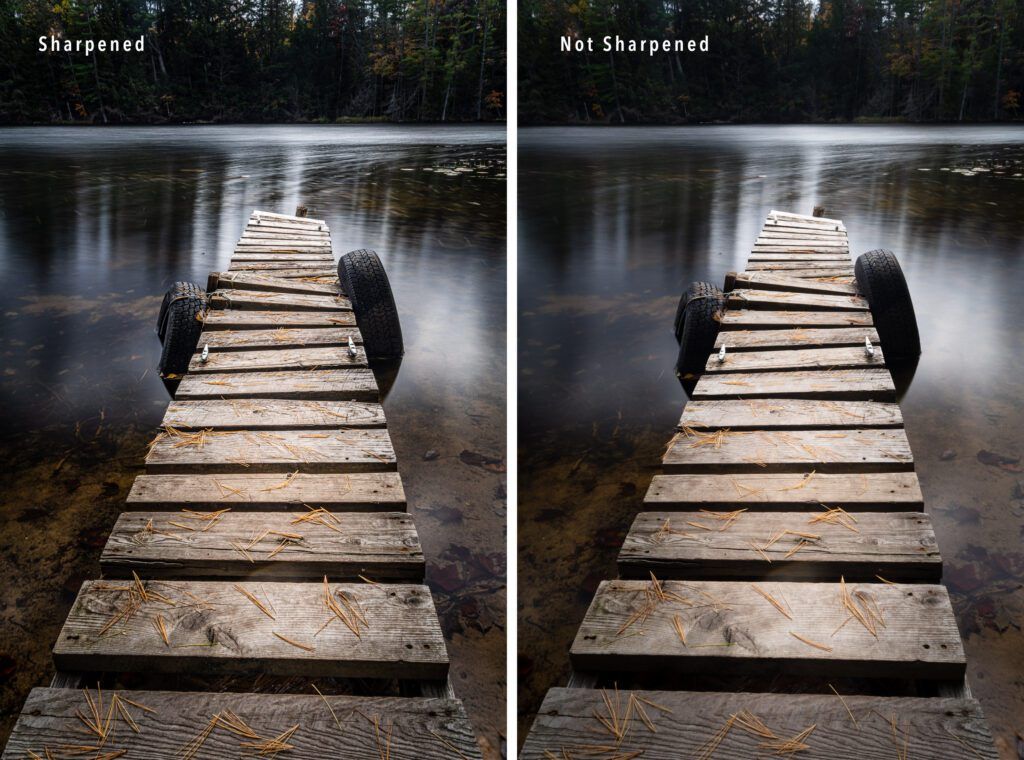
- Sharpening: Apply sharpening filters judiciously to enhance fine details. However, be cautious not to over-sharpen, as this can create unnatural halos or artifacts. Zoom in to 100% while sharpening to see the true effect.
- Noise Reduction: If your image has digital grain (noise), use noise reduction tools to clean it up, especially for low-light photos.
- Save in Appropriate File Formats: For professional printing, formats like TIFF and high-quality JPEG are generally preferred as they retain more image data. PDF is also excellent for documents with images. Avoid highly compressed JPEGs, which can introduce artifacts.
- Convert to CMYK Color Mode: Printers use the CMYK (Cyan, Magenta, Yellow, Black) color model, while screens use RGB (Red, Green, Blue). Converting your images to CMYK in your editing software before sending them to print helps ensure color accuracy and consistency between what you see on screen and what you get in print.
- Match Print Dimensions: Ensure your image dimensions match the desired print size. This prevents your image from being stretched or compressed, which can negatively impact clarity. Consider adding a bleed area for designs that extend to the edge of the paper.
- Consult with Your Printer: The team at Ewan Printing is here to help! If you’re unsure about optimal settings or file preparation, don’t hesitate to reach out. We can provide valuable insights based on our equipment capabilities and your specific project needs.
At Ewan Printing, located at 247 Damascus Street, Al Qusais Industrial Area, Dubai, United Arab Emirates, we pride ourselves on delivering exceptional print quality. By paying close attention to image clarity and sharpness, you can ensure your printed materials are not just seen, but truly make an impact. Let us help you bring your vision to life with stunningly clear and sharp results.
The most trusted and quality printing company, with excellent customer service. Best Quality Printing in Dubai
#EWANPRINTING
WhatsApp/Call us:
Arabic: 055 5771552
Arabic & English: 056 5071752 – (Send Query) https://wa.me/message/ZCPEMGR67ZD6G1
English | Urdu | Hindi: 050 508 6855
For latest offers
Email: printingewan@gmail.com
Location: Shop 26 and 28, Al Nasiriya Building, 247 Damascus Street, Al Qusais Industrial Area 1, Dubai, UAE
Leave a Reply